108.05.
Intro · Projektgruppen · Internet 101
215.05.
HTML und CSS (Frameworks)
322.05.
JS (Frameworks) und npm
429.05.
nodeJS: Scripting, Running, Building
505.06.
Express API, CRUD, Middlewares
612.06.
Projektwerkstattbericht
719.06.
Testing (Unit · Integration · E2E)
903.07.
Docker · Proxies · DBs
1010.07.
Wrap-up & Projektsupport
---
# Prüfungsleistung – Übersicht
Eigenes Projekt: **Web-App** ODER **Backend** (API/CLI).
| Punkte | Bereich |
|--------|---------|
| 30 | Grundanforderungen (Projektgrundlagen + Präsentation) |
| 25 | Clean Code Prinzipien |
| 25 | Accessibility & UX |
| 20 | Technische Umsetzung |
| **100** | **Basispunkte** |
| +15 | Bonuspunkte (max. 3 Features a 5 P.) |
---
# Prüfungsleistung – Grundanforderungen (30 P.)
**Projektgrundlagen (15 P.)**
- Funktionsfähige Anwendung (8 P.)
- Repository mit Versionskontrolle (4 P.)
- Projektdokumentation / README (3 P.)
**Präsentation (15 P.)**
- Elevator Pitch (5 P.)
- Technische Präsentation (5 P.)
- Projektevolution: wie hat sich das Projekt vs. Ursprungsidee verändert? (5 P.)
---
# Prüfungsleistung – Clean Code (25 P.)
**Projektstruktur (10 P.)**
- Ordnerstruktur (5 P.)
- Datei-Organisation (5 P.)
**Code-Qualität (10 P.)**
- KISS – Keep It Simple, Stupid (3 P.)
- Beschreibende Namen (3 P.)
- Funktionsverantwortlichkeiten (4 P.)
**Kommentierung & Dokumentation (5 P.)**
---
# Prüfungsleistung – Accessibility & UX (25 P.)
**Web Accessibility (15 P.)**
- Semantisches HTML (5 P.)
- ARIA Labels & Alt-Texte (5 P.)
- Tastaturnavigation (5 P.)
**Responsive Design (10 P.)**
- Mobile First Approach (5 P.)
- Flexbox/Grid Layout (5 P.)
---
# Prüfungsleistung – Technische Umsetzung (20 P.)
- Plattformunabhängigkeit (5 P.)
- Package Management (5 P.)
- Build Tools & Optimierung (5 P.)
- Live-Demo (5 P.)
---
# Prüfungsleistung – Bonuspunkte (max. 15 P.)
Mindestens 2 Bereiche wählen, je 5 Punkte:
- API Integration
- Local Storage / State Management
- Progressive Web App Features
- Testing
- Erweiterte Responsive Features (3+ Breakpoints)
- Security Features
---
# Prüfungsleistung – Abgabe & Termine
- **Code-Upload:** bis 27.07.
- **Präsentation:** 17.07. (Gruppen, ~10 Min.)
Details: https://git.librete.ch/DHBW/pruefungsleistung
---
# Internet-Timeline
| Jahr | Meilenstein |
|------|-------------|
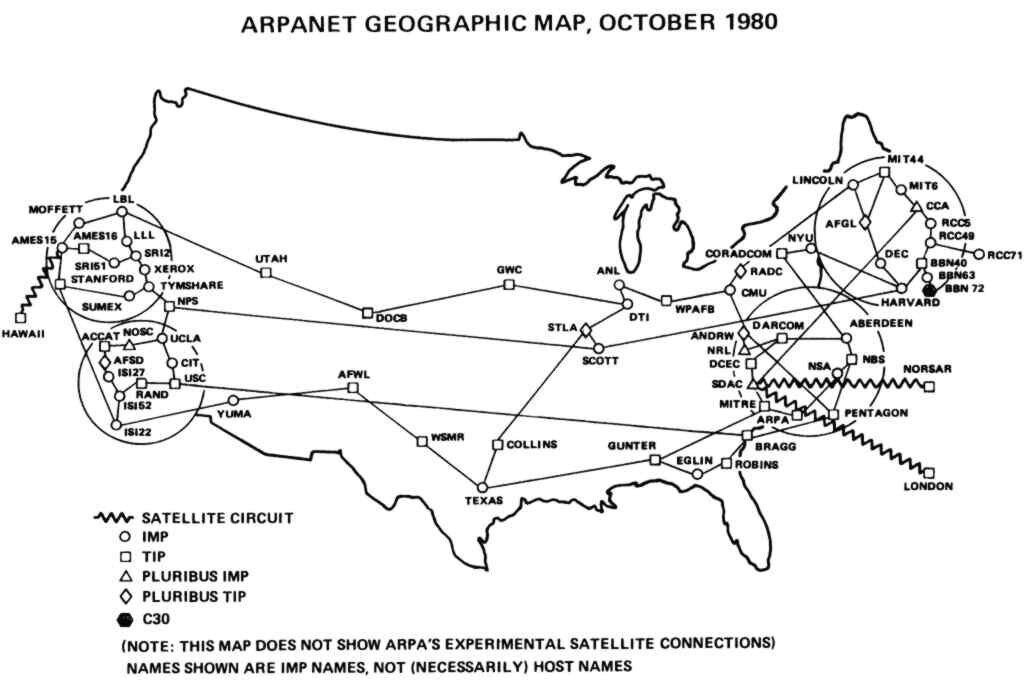
| **1966** | ARPANET-Projekt startet (DARPA) |
| **1969** | Erste Verbindung zwischen UCLA und Stanford |
| **1974** | TCP/IP-Protokoll entwickelt |
| **1989** | Tim Berners-Lee erfindet das WWW (CERN) |
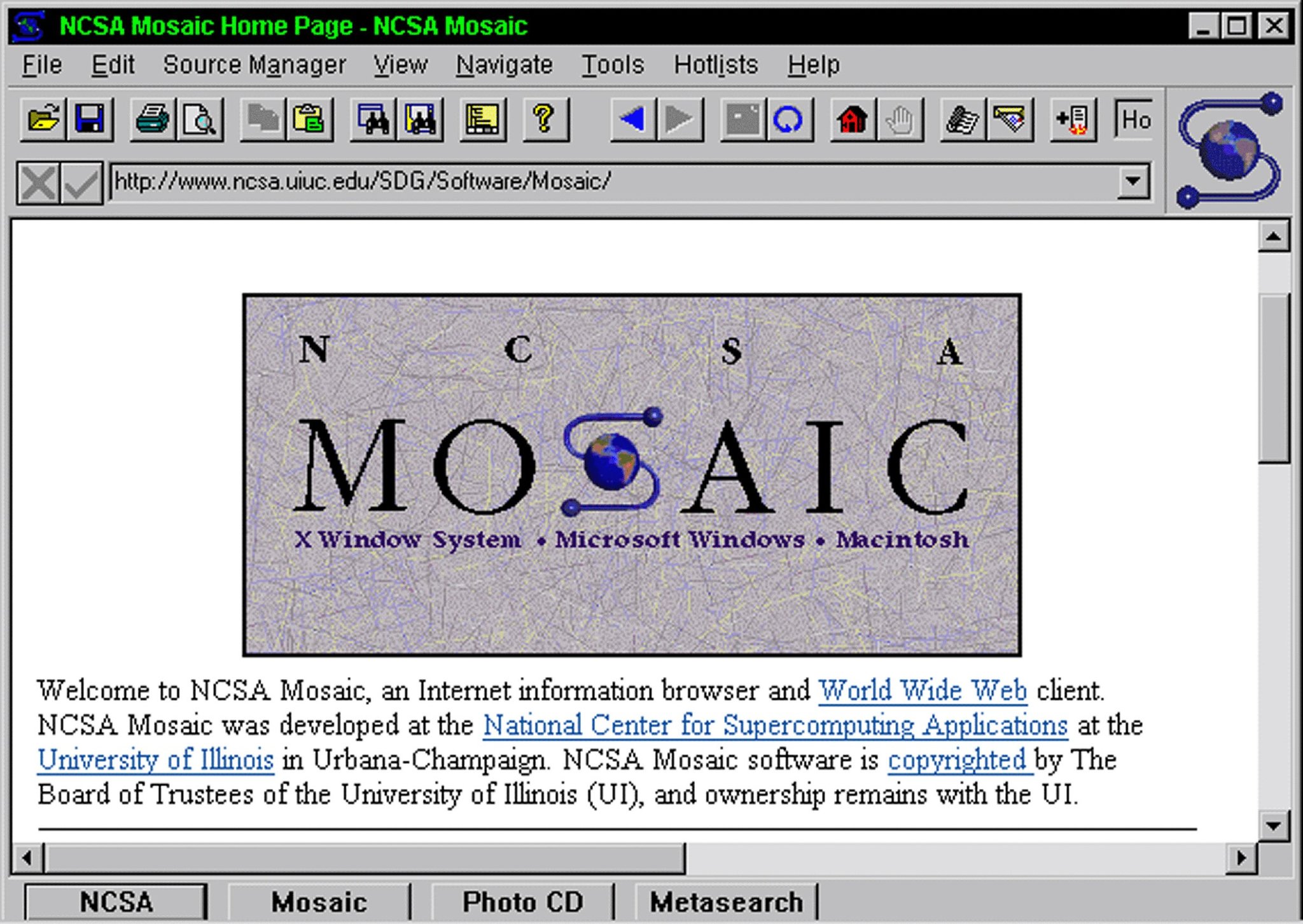
| **1993** | Mosaic — erster grafischer Browser |
| **1994** | W3C gegründet (HTML, CSS, SVG, WCAG) |
| **1995** | ECMAScript / JavaScript wird Standard |
| **2008** | V8 JavaScript Engine (Chrome / Node.js) |
---
---
# Das WWW (1989)
**Tim Berners-Lee** am **CERN** (Genf)
**Problem:** Wissenschaftler:innen können Forschungsdokumente nicht verlinken — Inkompatible Systeme, kein gemeinsames Format.
**Lösung — drei Bausteine:**
- **HTML** — Auszeichnungssprache für Dokumente
- **HTTP** — Protokoll zur Übertragung
- **URL** — eindeutige Adressen
**1991:** erste Webseite geht online · 1993 vom CERN gemeinfrei freigegeben.
→ WWW ≠ Internet. Das WWW ist eine **Anwendung auf** dem Internet.
---
---
---
# Heute: Physische Infrastruktur
- **5,5 Milliarden** Menschen online
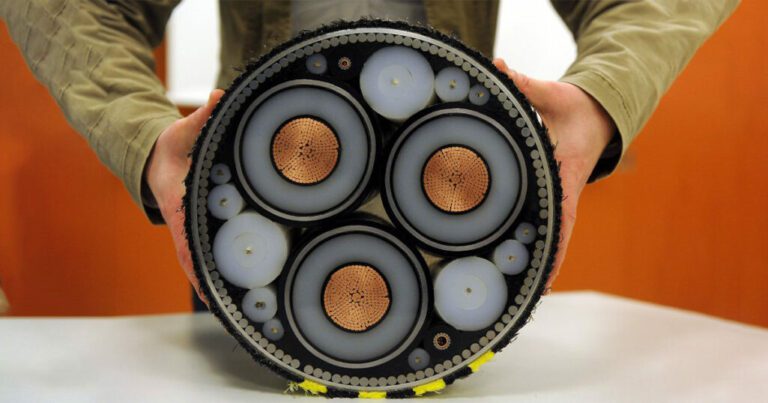
- **> 400 Unterseekabel**, ca. **1,3 Mio. km** Glasfaser
- Daten reisen mit **Lichtgeschwindigkeit**
- Latenz Frankfurt — New York: ~80 ms
→ Keine "Cloud" ohne Kabel. Das Internet ist **physische** Infrastruktur — und damit angreifbar.
**Geopolitik:** Five-Eyes-Allianz (USA, UK, CA, AU, NZ) zapft Unterseekabel ab (Programm "Tempora", aufgedeckt 2013 durch Snowden). DE ist Teil der Fourteen Eyes.
---
---
# HTTP – Hypertext Transfer Protocol
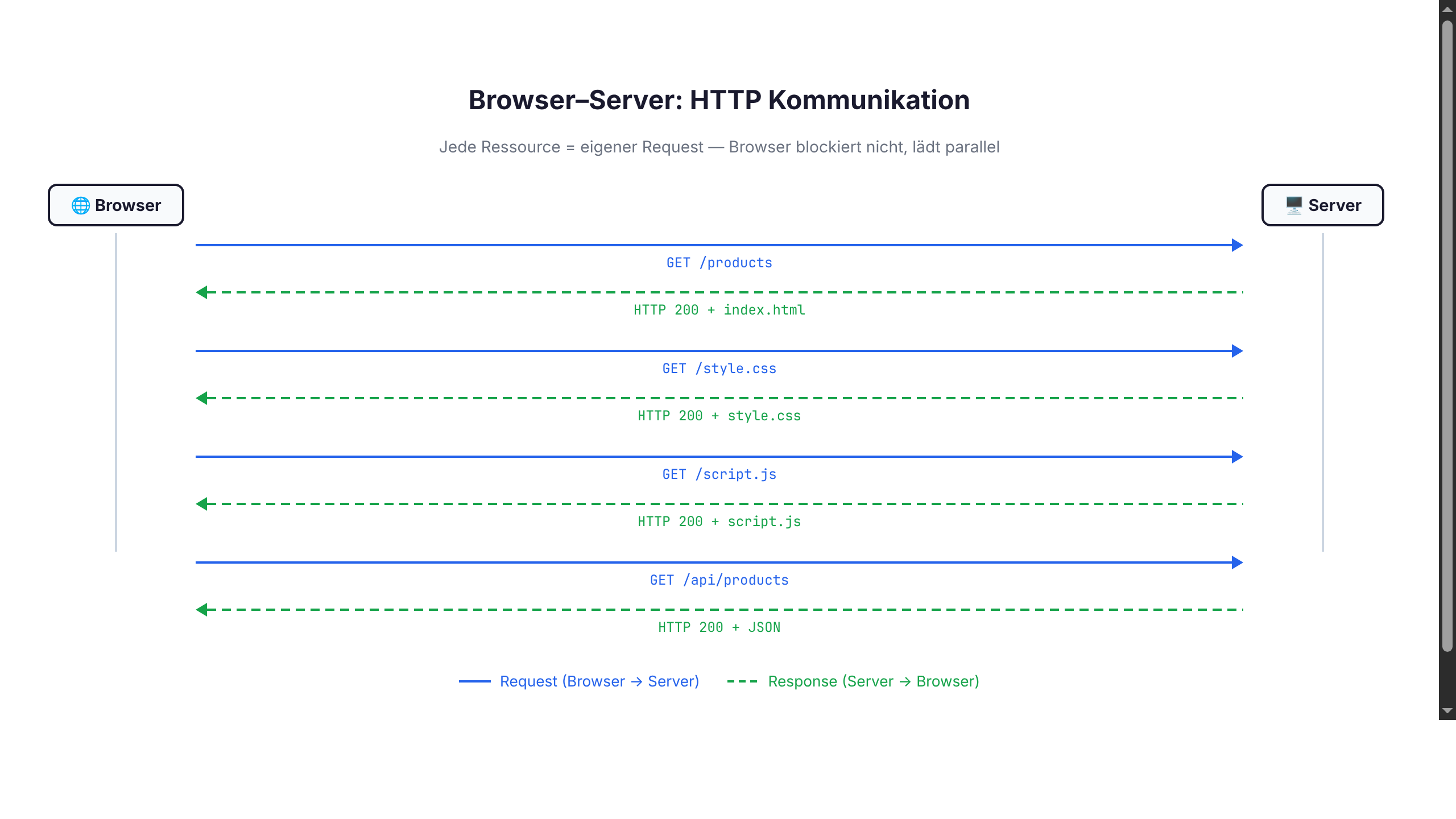
**Request:**
```
GET /products HTTP/1.1
Host: localhost:8080
```
**Response:**
```
HTTP/1.1 200 OK
Content-Type: application/json
[{"id": 1, "name": "Produkt A"}, ...]
```
---
# Onboarding
## Tools, Runtimes, Workflows
---
# Werkzeuge & Betriebssystem
**Erforderliche Werkzeuge:**
- **Terminal** (zsh / bash / fish / pwsh) — Kommandozeile
- **Editor** (siehe folgende Folie)
- **JavaScript-Runtime** (Node.js / Bun / Deno)
- **Browser mit DevTools** (Chromium / Firefox / Safari)
- **Git** — verteiltes Versionskontrollsystem (Stand der Industrie)
**OS-Empfehlung:**
| OS | Status |
|----|--------|
| **macOS** | First-class, viele Tools "just work" |
| **Linux** | First-class, beste Server-Parität |
| **Windows + WSL2** | Empfohlen — Windows-CLI hat Edge Cases |
| **Windows nativ** (PowerShell) | Funktioniert, aber holpriger Pfad |
---
# Node.js installieren – macOS
Empfohlen: **LTS** (aktuell **Node.js 24** — Stand 2026).
Paketmanager: **[Homebrew](https://brew.sh)**
```bash
# Homebrew installieren (falls nicht vorhanden)
/bin/bash -c "$(curl -fsSL https://raw.githubusercontent.com/Homebrew/install/HEAD/install.sh)"
# Node.js LTS installieren
brew install node@24
# Version prüfen
node --version
npm --version
```
Alternative: Installer von [nodejs.org](https://nodejs.org)
---
# Node.js installieren – Linux
Empfohlen: **LTS** (aktuell **Node.js 24**).
**Debian / Ubuntu** ([NodeSource](https://github.com/nodesource/distributions)):
```bash
curl -fsSL https://deb.nodesource.com/setup_lts.x | sudo -E bash -
sudo apt install -y nodejs
```
**Arch / Manjaro:**
```bash
sudo pacman -S nodejs npm
```
**Fedora / RHEL:**
```bash
sudo dnf module install nodejs:24/common
```
→ Distro-Pakete sind oft **veraltet**. Versionsmanager (folgende Folie) bevorzugen.
---
# Node.js installieren – Windows
Empfohlen: **LTS** (aktuell **Node.js 24**).
**Option 1: winget** (empfohlen, Win 10/11):
```powershell
winget install OpenJS.NodeJS.LTS
```
**Option 2: Chocolatey** ([chocolatey.org](https://chocolatey.org)):
```powershell
choco install nodejs-lts
```
**Option 3: Scoop** ([scoop.sh](https://scoop.sh)):
```powershell
scoop install nodejs-lts
```
**Option 4:** Installer von [nodejs.org](https://nodejs.org)
→ **Empfehlung:** WSL2 + Linux-Workflow nutzen.
---
# Direkt-Install: Wenn es eng wird
**Typisches Szenario** — drei parallele Projekte mit unterschiedlichen Anforderungen:
| Projekt | Stack | Node-Version |
|---------|-------|--------------|
| Praktikums-API | Express (Legacy) | 18.x (LTS Hydrogen) |
| Studienarbeit | Next.js 15 | 22.x (LTS Jod) |
| Aktuelles Lab-Projekt | neueste Features | 24.x (Iron, current LTS) |
System-Install kennt nur **eine** Node-Version global → Konflikt.
---
# Symptome im Alltag
- `npm install` bricht mit `engines`-Warning ab
- native Module (z. B. `node-sass`) bauen nicht
- CI-Pipeline ist grün, lokal rot — oder umgekehrt
- erheblicher Zeitverlust beim Debuggen von Versions-Konflikten
→ Lösung: **Versionsmanager** und Node-Version pro Projekt pinnen.
---
# Node-Versionsmanager
Verschiedene Projekte brauchen oft verschiedene Node-Versionen. **Lösung:** Versionsmanager.
| Tool | Sprache | Geschwindigkeit | Plattform |
|------|---------|-----------------|-----------|
| **nvm** | Bash | langsam (Shell-Funktion) | macOS, Linux |
| **fnm** | Rust | sehr schnell | macOS, Linux, Windows |
| **asdf** | Bash | mittel, multi-language | macOS, Linux |
| **volta** | Rust | schnell, pinning per `package.json` | alle |
```bash
# fnm
curl -fsSL https://fnm.vercel.app/install | bash
fnm install --lts # aktuell Node 24
fnm use lts-latest
# .nvmrc / .node-version automatisch
echo "lts/*" > .nvmrc
fnm use # liest .nvmrc
```
---
# Alternative Runtimes
| Runtime | Erschienen | Engine | USP |
|---------|------------|--------|-----|
| **Node.js** | 2009 | V8 (C++) | Standard, größtes Ökosystem |
| **Deno** | 2020 | V8 (Rust) | Sicherheit, TypeScript nativ, Std-Lib |
| **Bun** | 2022 | JavaScriptCore (Zig) | Geschwindigkeit, all-in-one |
```bash
# Deno
curl -fsSL https://deno.land/install.sh | sh
deno run main.ts
# Bun
curl -fsSL https://bun.sh/install | bash
bun install
bun run dev
```
→ Im Kurs primär **Node.js**. Bun und Deno sind ebenfalls zulässig.
---
# Editor
- **VS Code** (empfohlen) — kostenlos, große Plugin-Auswahl
- **JetBrains WebStorm** — sehr mächtig, kostenpflichtig
- kostenlos für Studierende via [JetBrains Education](https://www.jetbrains.com/community/education/#students)
- **Vim / Neovim / Emacs** — für CLI-Profis
- **Zed** — modern, schnell
---
# Browser DevTools
Chromium / Firefox / Safari — `F12` oder `Cmd+Opt+I`