# @marp-team/marpit-svg-polyfill
[](https://circleci.com/gh/marp-team/marpit-svg-polyfill/)
[](https://codecov.io/gh/marp-team/marpit-svg-polyfill)
[](https://www.npmjs.com/package/@marp-team/marpit-svg-polyfill)
[](./LICENSE)
The polyfill for [the inline SVG slide][inline-svg] rendered by [Marpit].
[marpit]: https://github.com/marp-team/marpit
[inline-svg]: https://marpit.marp.app/inline-svg
### Supported browser
- [WebKit](#webkit) based browser: Safari and iOS browsers (including iOS Chrome, iOS Firefox, iOS Edge, and so on...)
## Usage
```html
```
## Why need?
### WebKit
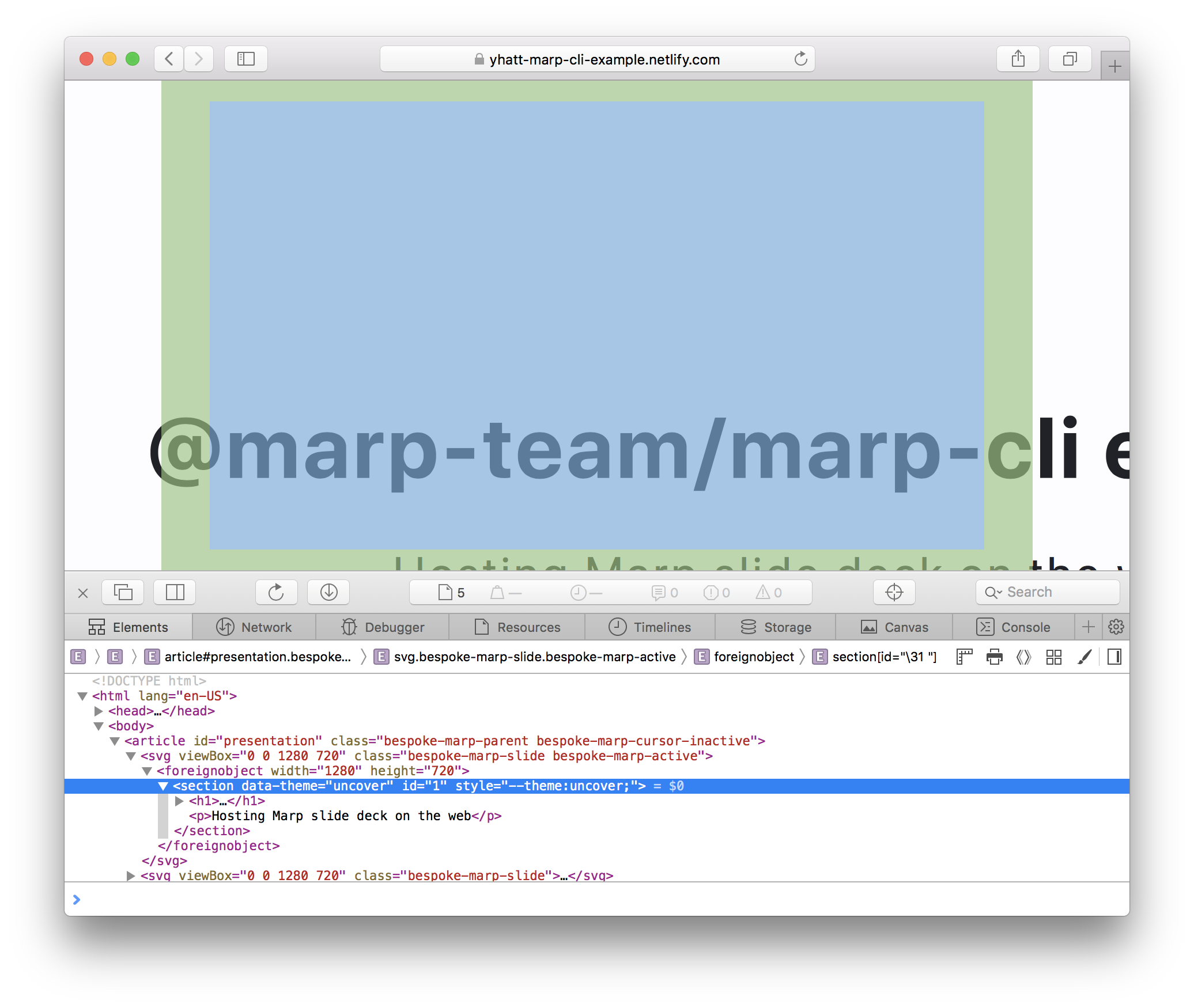
[Marpit]'s [inline SVG slide][inline-svg] has a lot of advantages: No requires JavaScript, gives better performance for scaling, and has predicatable DOM structure.
But unfortunately, WebKit browser has not scaled the wrapped HTML correctly. It is caused from a long standing [bug 23113](https://bugs.webkit.org/show_bug.cgi?id=23113), and it does not resolved in the last 15 years.
> **Note**
> A brand-new SVG engine for WebKit called as [**"Layer-based SVG engine (LBSE)"**](https://blogs.igalia.com/nzimmermann/posts/2021-10-29-layer-based-svg-engine/) is currently under development, and it will finally bring glitch-free scaling without JS. (See also: [Status of the new SVG engine in WebKit](https://wpewebkit.org/blog/05-new-svg-engine.html))
>
> You can test LBSE in [Safari Technology Preview](https://developer.apple.com/safari/technology-preview/) by following these steps:
>
> 1. Install Safari Technology Preview
> 1. Run `defaults write com.apple.SafariTechnologyPreview IncludeInternalDebugMenu 1` in terminal
> 1. Open Safari Technology Preview
> 1. Turn on **"Layer-based SVG engine (LBSE)"** from "Debug" menu → "WebKit Internal Features"
> 1. Restart app
>
> marpit-svg-polyfill v2.1.0 and later will try to detect whether or not enabled LBSE, and does not apply polyfill if LBSE was available.
## Solutions
### For Webkit
#### Scaling
We try to simulate scaling and centering by applying `transform` / `transform-origin` style to Marpit `` elements.
```html
```
marpit-svg-polyfill uses the result of `getScreenCTM()` method, so the polyfill will sacrifice "zero-JS slide", the key feature of inline SVG.
#### Repainting
WebKit browser would not trigger repainting even if modified the contents of slide. It becomes a problem when supporting the live preview feature in Marp tools.
Fortunately, [a genius already resolved this problem only in CSS!](https://stackoverflow.com/a/21947628) `transform:translateZ(0)` would trigger re-painting immidiately when modified contents.
#### Animation GIF
People like to put GIF animation in the slide. However, GIF in polyfilled slides have glitches. GIF updates only a cropped part somewhere.
Applying `transform:translateZ(0.0001px)` to each `` elements within SVG is a magic to resolve that. 🪄
> **Warning**
> This style brings slightly blurred contents too. Our polyfill prefers to render animated contents correctly.
## Contributing
We are following [the contributing guideline of marp-team projects](https://github.com/marp-team/.github/blob/master/CONTRIBUTING.md). Please read these guidelines this before starting work in this repository.
## Author
Managed by [@marp-team](https://github.com/marp-team).
- Yuki Hattori ([@yhatt](https://github.com/yhatt))
## License
This module releases under the [MIT License](LICENSE).
 Yuki Hattori ([@yhatt](https://github.com/yhatt))
## License
This module releases under the [MIT License](LICENSE).
Yuki Hattori ([@yhatt](https://github.com/yhatt))
## License
This module releases under the [MIT License](LICENSE).